06 · case study · founding lead product designer
Relo Conversational AI Agent: a home-grown AI agent, designed from the data and shipped, adopted by 78% of clients
After the first Automated Insights pilot launched in Relo Edge, power users and everyday users both wanted a faster way to their data. I designed and shipped a home-grown conversational AI agent on Relo Edge, with two ways in: ready-made insights, and a conversation with the agent. What went into each came from the queries clients were already running.
- role
- Founding lead product designer and research lead, Relo Metrics
- dates
- 2025
- the squad
- A product manager, a frontend developer, a backend developer, and me as product designer and research lead
- approach and tools
- Continuous discovery with a product advisory board every two weeks. Saved queries in Looker, usage in Pendo, a clickable prototype in v0 and Claude Code
- 78%adoption across the clients it was released to
- 40clients, including NFL, NBA and MLB teams
- 2ways in: Automated Insights and Custom Insights
- 2 weeksbetween advisory board sessions, from discovery to release
01 · business need
The business need
The Relo Edge redesign set a goal to lay the foundation for AI and automated insights, and it launched with a first Automated Insights pilot. The conversational AI agent came after that launch, and built on it. It is home-grown: built in-house by the Relo team, not a bought-in chatbot. In the product it appears as two tabs, Automated Insights and Custom Insights.
Relo Edge held the data clients needed, but getting to an answer still meant building it: choosing filters, reading tables and comparing numbers by hand.
The business need was to shorten the time from opening the platform to a decision a client can act on, for every kind of user, and to keep clients inside Edge to analyse and decide instead of exporting to check the numbers.
02 · customer needs
Two kinds of user, one request
Power users and regular users asked for the same thing in different words: quicker access to their data. They wanted insights generated for them, a way to ask an AI agent a question in plain language, and pre-built insights to start from.
regular users
Want a ready-made insight they can open in one click, without setting anything up.
power users
Want to ask their own question and get an answer with the numbers and a chart.
both
Quicker access to their data, in answers they can trust, keep and reuse.
03 · how the work ran
Start from the questions clients already ask
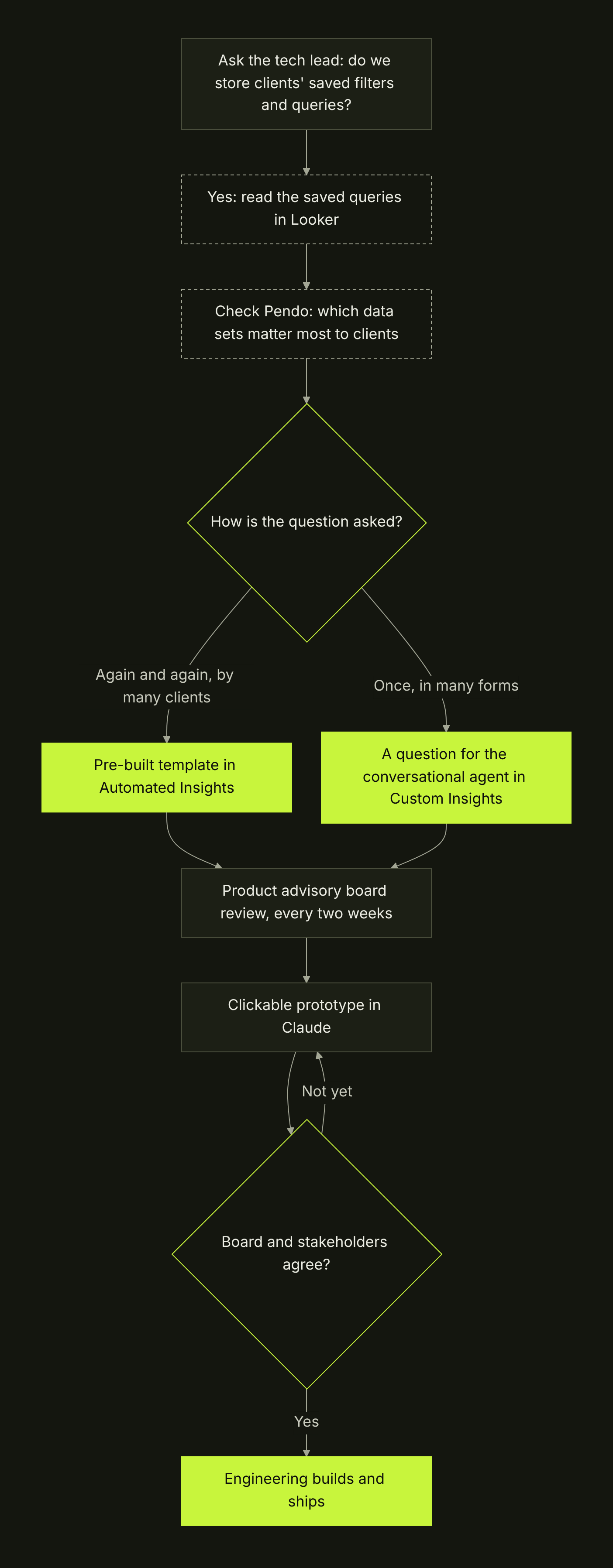
Before designing anything, I asked our tech lead whether we had clients' filtered data saved. We did. That gave me evidence of what people actually ask the platform, instead of what we assumed they would ask.
- Find the evidenceThe tech lead confirmed that clients' saved filters and queries were stored.
- Read the saved queriesIn Looker, I went through our internal custom data to see which questions clients ran, and how often.
- Check usageIn Pendo, I looked at which data sets mattered most to clients.
- Sort the questionsQuestions asked again and again became pre-built insights. Open-ended ones became the job of the conversational agent.
- Review every two weeksThe product advisory board gave feedback in sessions every two weeks.
- Prototype, then buildA quick clickable prototype for stakeholders and the board, then handed to engineering to build and ship.
We followed the approach in Teresa Torres's Continuous Discovery Habits: stay in regular contact with customers, and test assumptions in small steps before building. To make that contact routine, we created a product advisory board.
- InternalStakeholders from the teams that hear client questions every day.
- Rights holdersSeveral team clients, who need to prove partner value.
- AgenciesWho need client-ready insights fast.
- BrandsBrand managers, who need to know what is working and defend it.
Continuous discovery: pain points become opportunities, then solutions
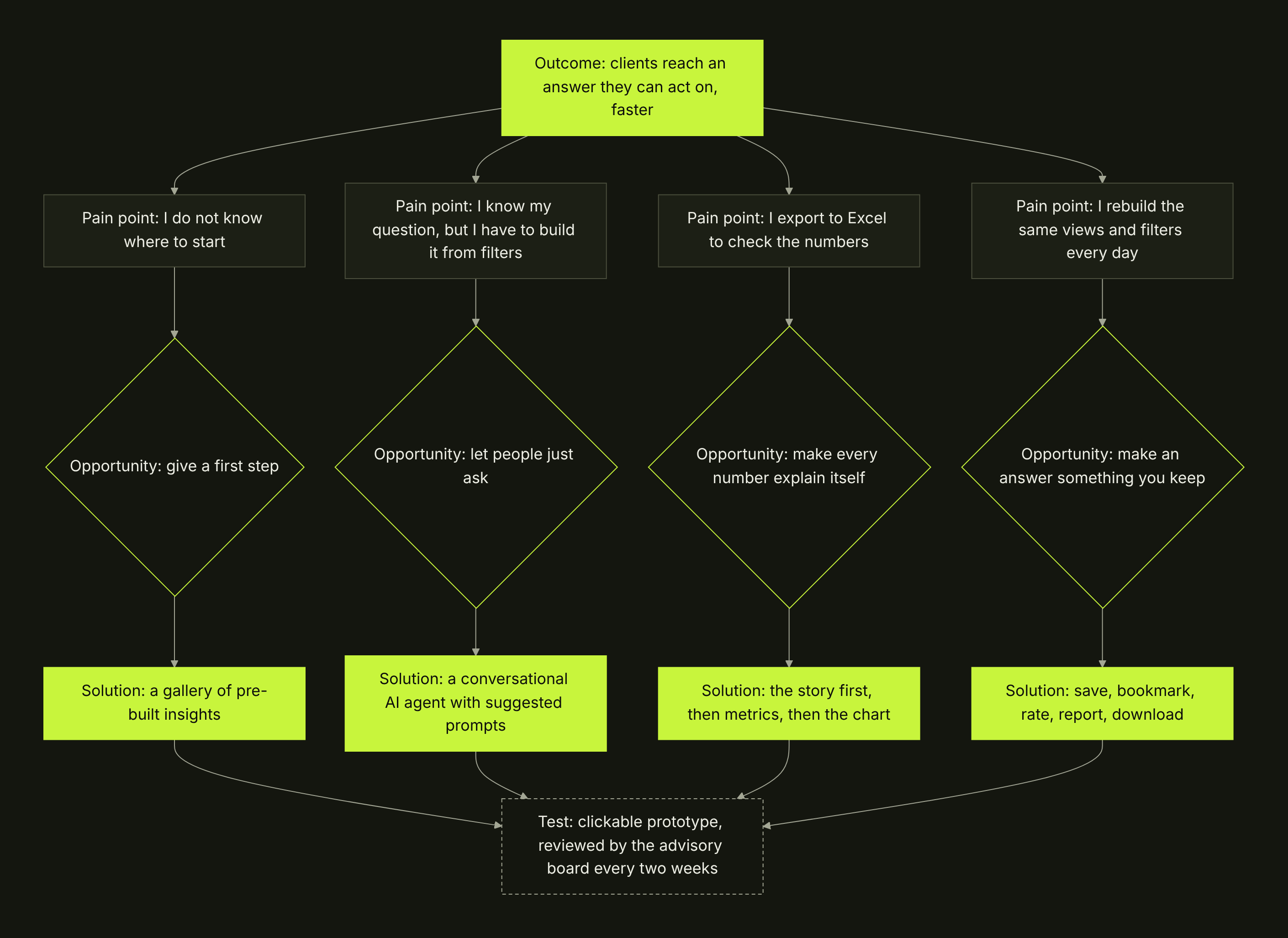
Each session with the board added to one picture: the outcome we wanted, the pain points behind it, the opportunity in each pain point, and the solution we would test. Nothing went to engineering until it had been through that path.
- not knowing where to start
- Opportunity: give a first step. Solution: a gallery of pre-built insights.
- knowing the question, but having to build it from filters
- Opportunity: let people just ask. Solution: a conversational AI agent with suggested prompts.
- exporting to Excel to check the numbers
- Opportunity: make every number explain itself. Solution: the story first, then the metrics, then the chart.
- rebuilding the same views and filters every day
- Opportunity: make an answer something you keep. Solution: save, bookmark, rate, report and download.
The agentic AI workflow
This went straight from Claude to shippable code. There was no long design file stage. I gave the evidence to AI agents, got a working prototype back quickly, and kept iterating on that same version with the board's feedback.
- Brief the agentThe saved-query findings, the pain points and the Relo Edge components, written as a brief.
- Generate a prototypeA working, clickable version in Claude, built in v0 and Claude Code, not a static mockup.
- Review it myselfI checked each screen against the evidence from the saved queries.
- Put it in front of peopleStakeholders and the external board members clicked through it every two weeks.
- Iterate in the same versionEach round of feedback went back into the Claude version, not into a new file.
- Hand over codeEngineering started from the prototype's code to build and ship.
what the agents did
Turned the brief into working screens and code, and made each change in minutes.
what stayed with me
Which questions matter, what an insight must contain to be trusted, and when it was ready for engineering.
why it was fast
The prototype people tested was the same thing engineering built from.
- problem
- Clients have the data but not the answer. Reaching one takes filters, tables and manual comparison, and many users do not know where to start.
- who it is for
- Regular users who want a ready-made insight, and power users who want to ask their own question.
- solution
- Two tabs on Relo Edge. Automated Insights: a gallery of pre-built insight templates. Custom Insights: a conversation with an AI agent.
- every insight includes
- Trending metrics, top performers, key metrics, actionable recommendations and a chart.
- keep and reuse
- Save an insight, bookmark a template, rate an insight, generate a report, and download a chart as an image.
- success measure
- Adoption across the clients it is released to.
04 · decision 1 of 5
Let the data decide what is pre-built and what is asked
The usual way to design an AI feature is to guess what people will ask it. I used the saved queries instead. Reading them in Looker, next to the Pendo usage data, showed two kinds of question.
asked again and again
The same cuts of the same data, run by many clients. These became the pre-built Automated Insights.
asked once, in many forms
Specific, changing questions. These are what clients would ask the conversational AI agent.
why it mattered
Every template and every suggested prompt traces back to something clients were already doing.
04 · decision 2 of 5
Two ways in, for two kinds of user
One entry point would have failed one of the two groups. A question box alone leaves a regular user staring at an empty field. A fixed list of insights alone holds a power user back.
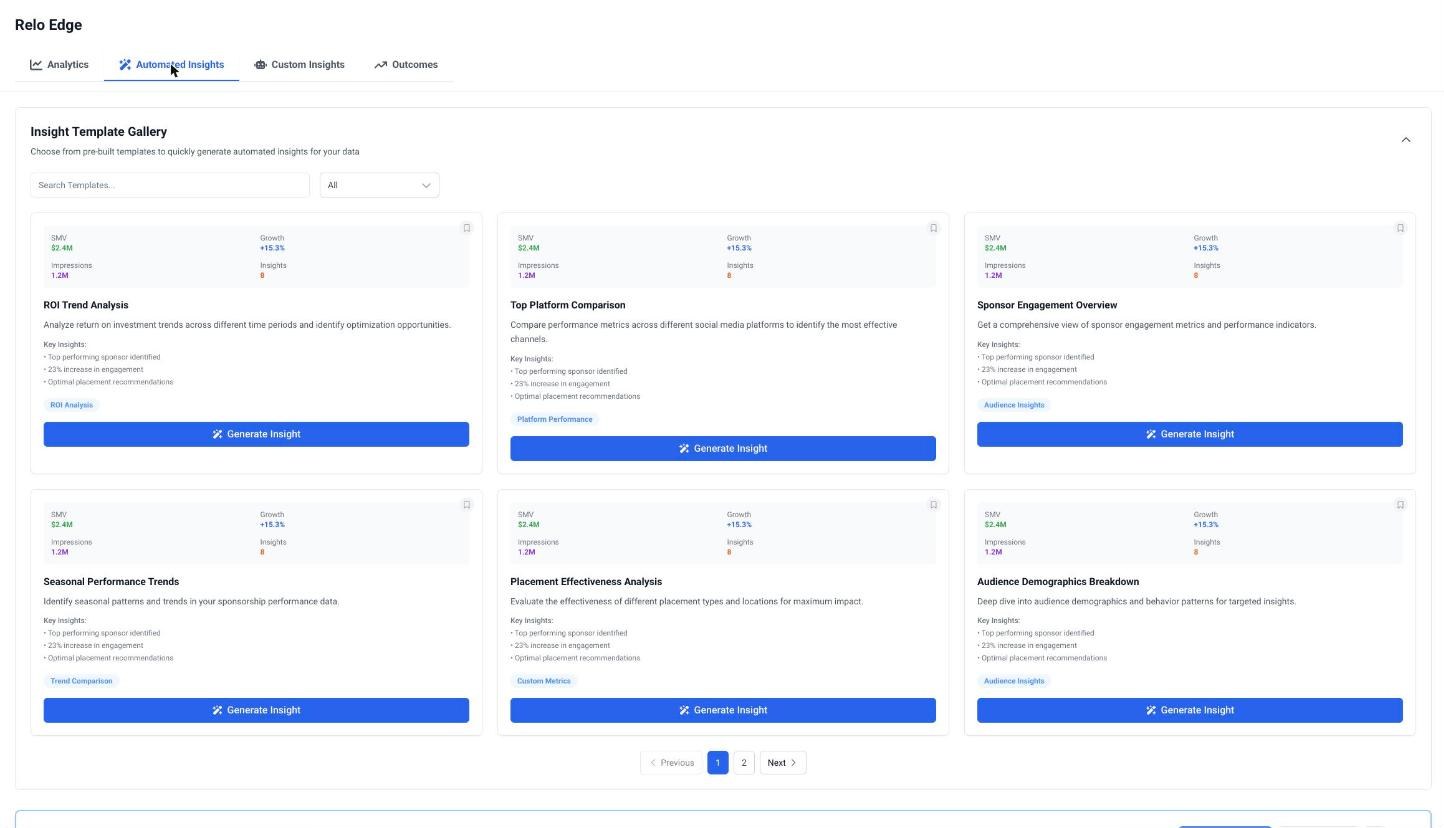
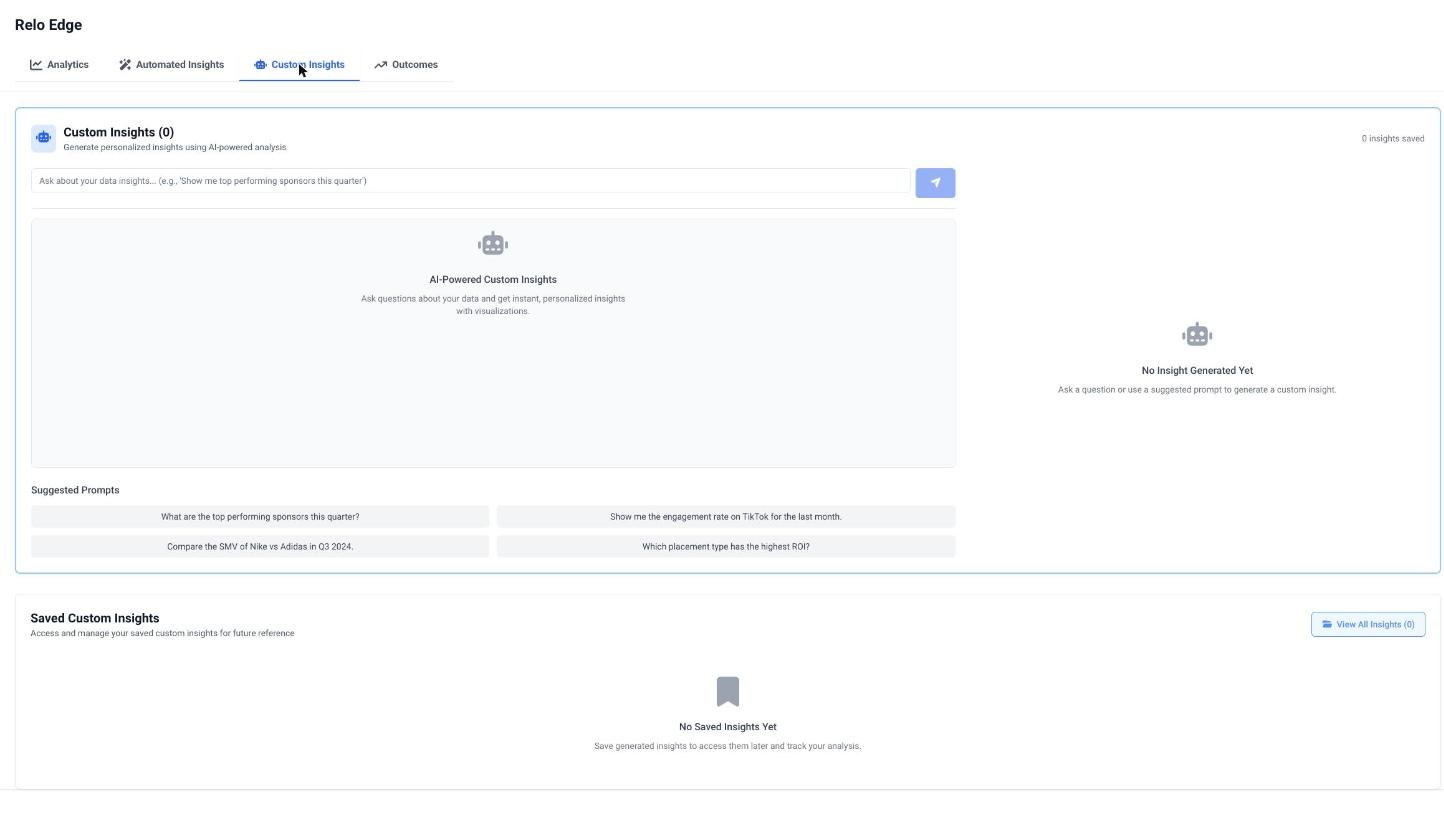
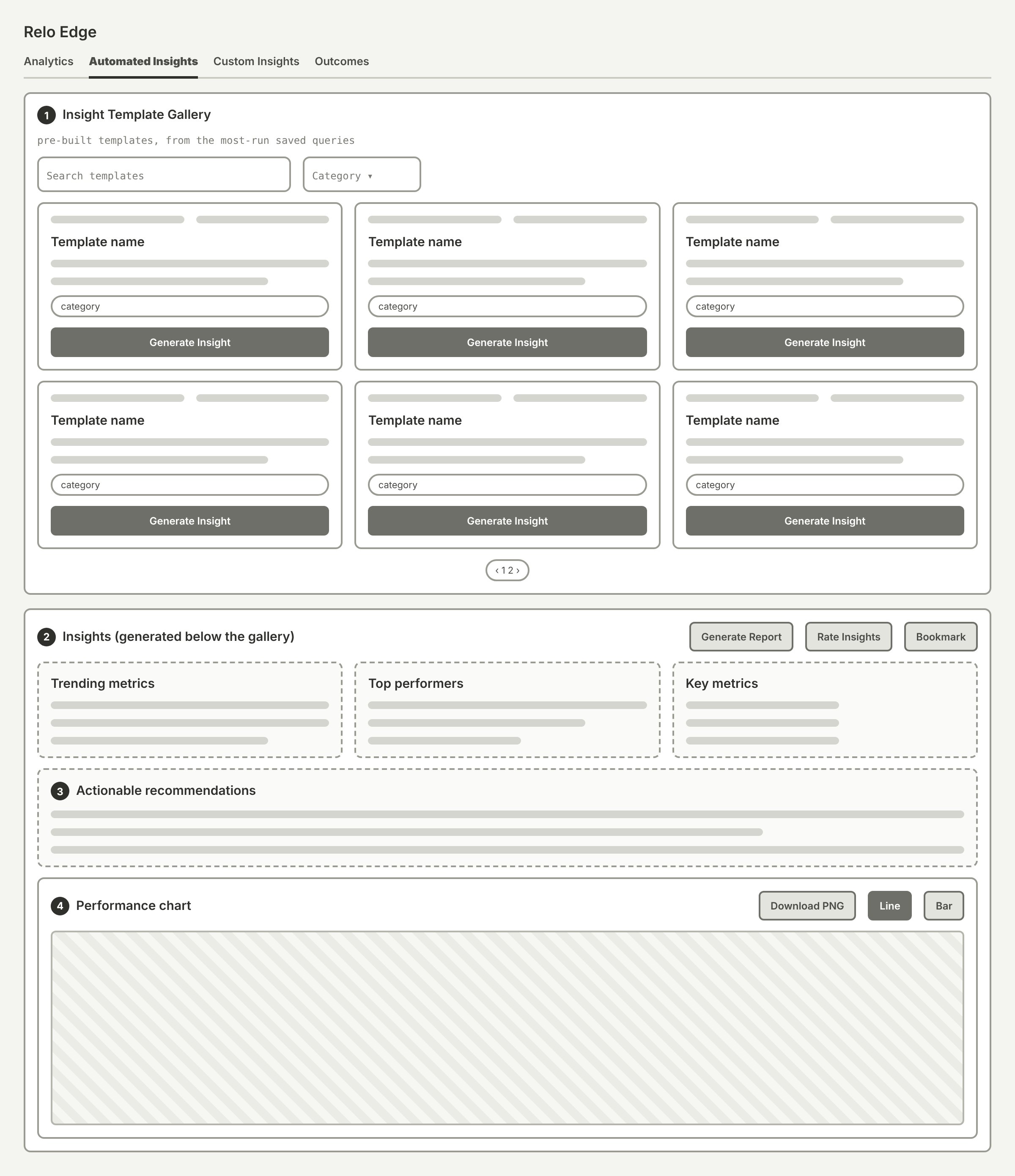
Automated Insights opens on a gallery of templates, such as ROI Trend Analysis, Top Platform Comparison and Placement Effectiveness Analysis, each with a Generate Insight button. Custom Insights opens on a question box with suggested prompts, so even the conversation has a starting point.
04 · decision 3 of 5
Lead with the story, then show the numbers
In the first pilot, an insight was one card with a chart and a metrics table. Clients trusted what it detected, and said it flagged placements they would have missed. They also asked for a plain-language summary first, and for real examples to make it concrete.
So every insight now reads in the same order: what is trending, who the top performers are, the key metrics, and recommendations a person can act on. The chart comes after, as the evidence.
what clients trusted
The detection. It surfaced placements they would have missed.
what they asked for
A clear summary in plain language first, and example exposures for context.
what I changed
Narrative first, then the data, then the chart. Every metric is explained.
04 · decision 4 of 5
An answer is something you keep
Users had told us they rebuilt the same views and filters every day. An insight that disappears would repeat that problem. Every generated insight can be saved, rated and turned into a report, templates can be bookmarked, and every chart downloads as an image for a deck.
Rating matters for the product as well as the user: it tells us which insights are useful, and which are not.
04 · decision 5 of 5
Go straight from Claude to shippable code
A static mockup cannot show what an AI answer feels like. I turned the findings and the board's feedback into a quick clickable prototype in v0 and Claude Code, on the Relo Edge components. Stakeholders and the external advisory board members could click through real flows: generate an insight, ask a question, read the answer, switch the chart.
The same prototype went to engineering as the starting point to build and ship from.
05 · flows, schema and wireframes
How the feature works, on paper
Five diagrams of the feature: the opportunity tree, how each question was sorted, the two user flows and the objects the interface works with. Lime is an end state and a dashed box is a system step.
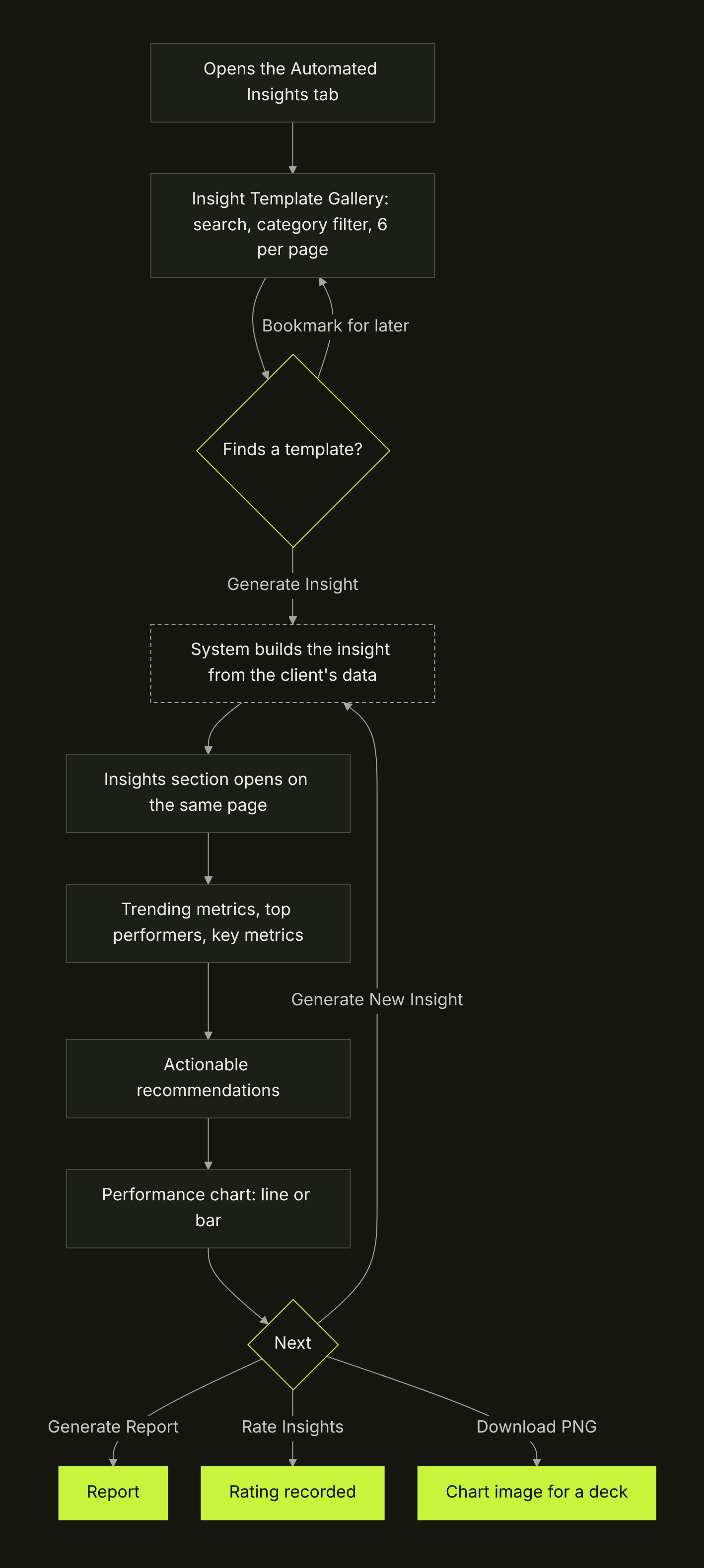
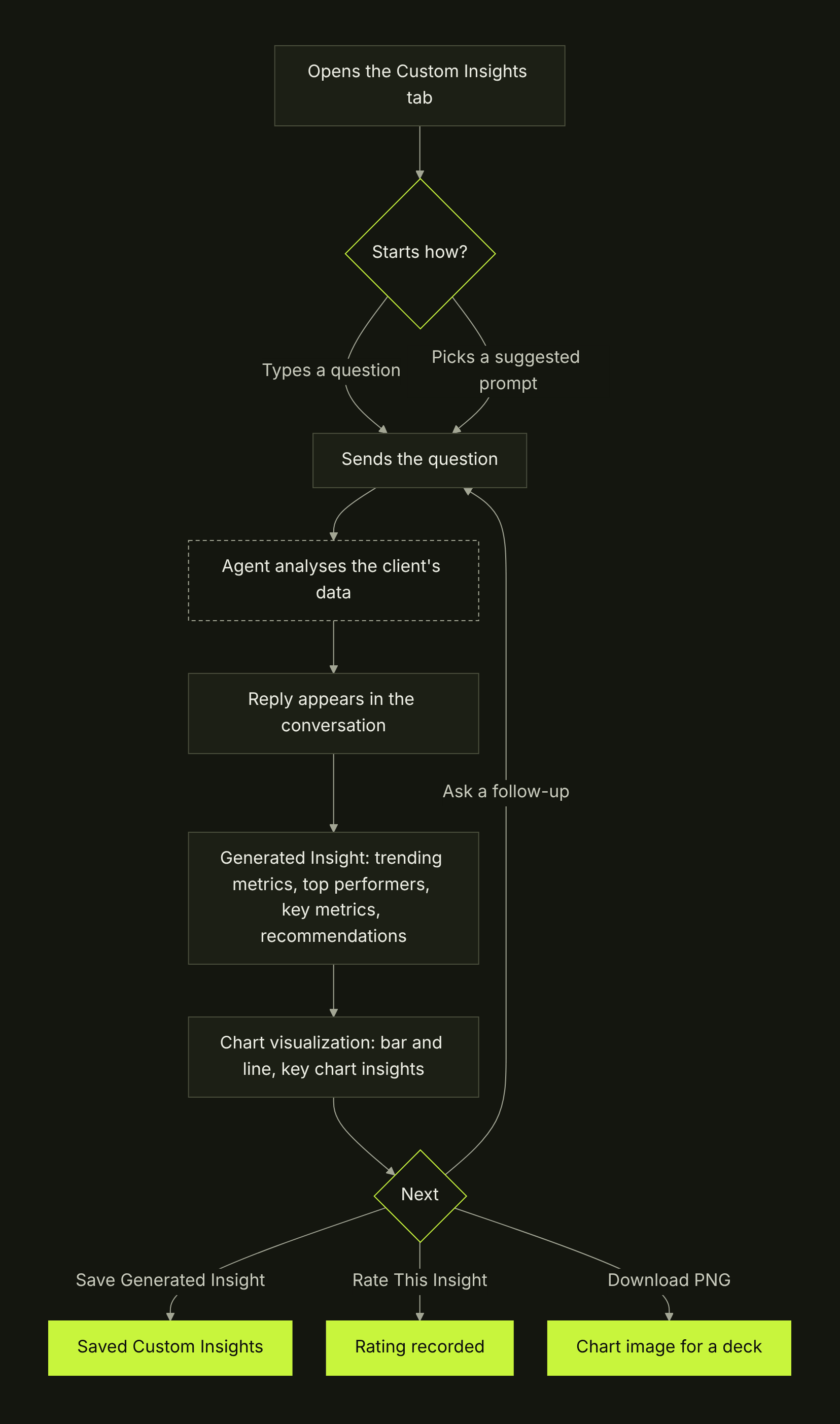
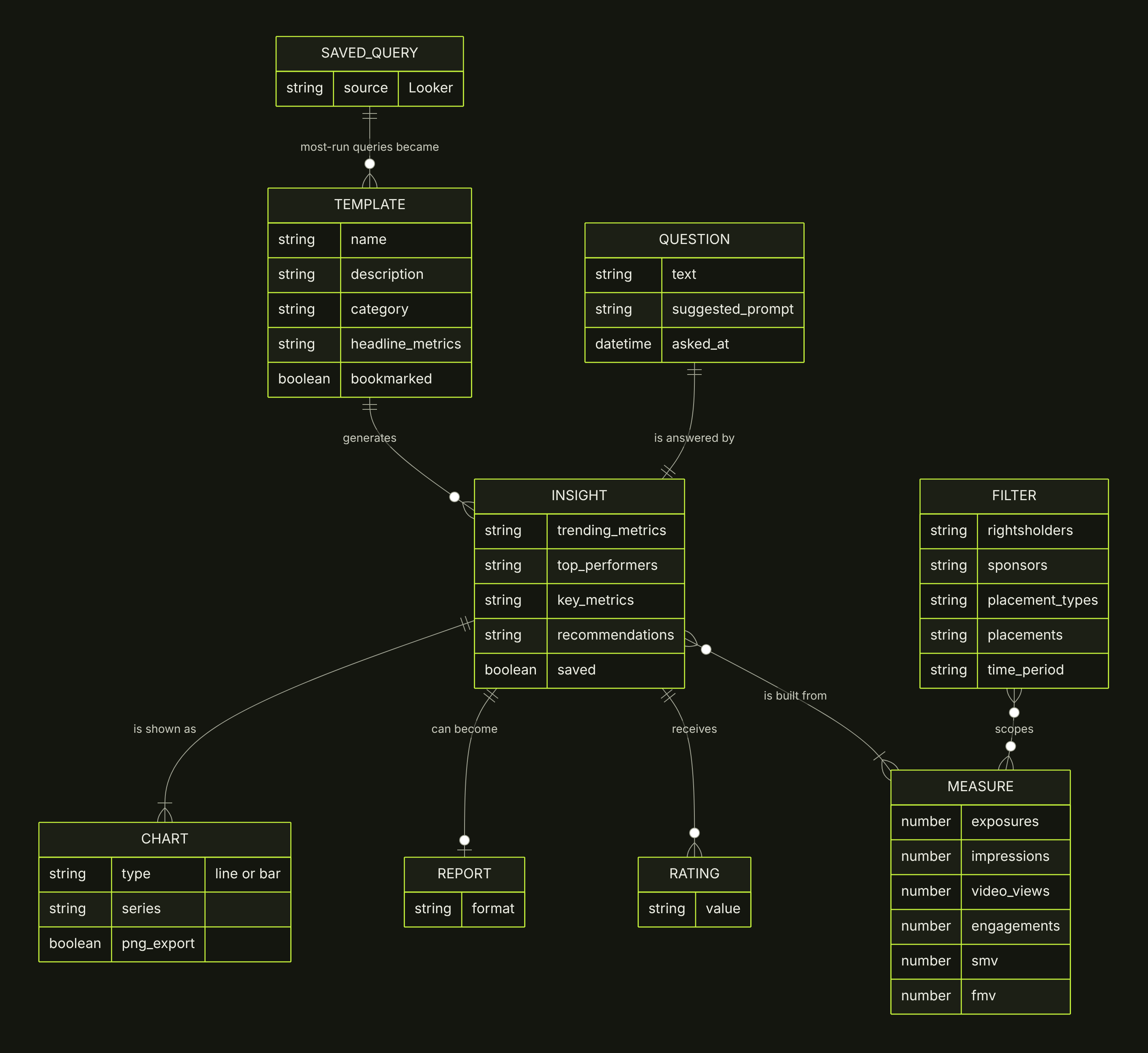
Tap a diagram to zoom in. Tap again to zoom out.
The schema shows the objects as the interface presents them. It is not the database design.
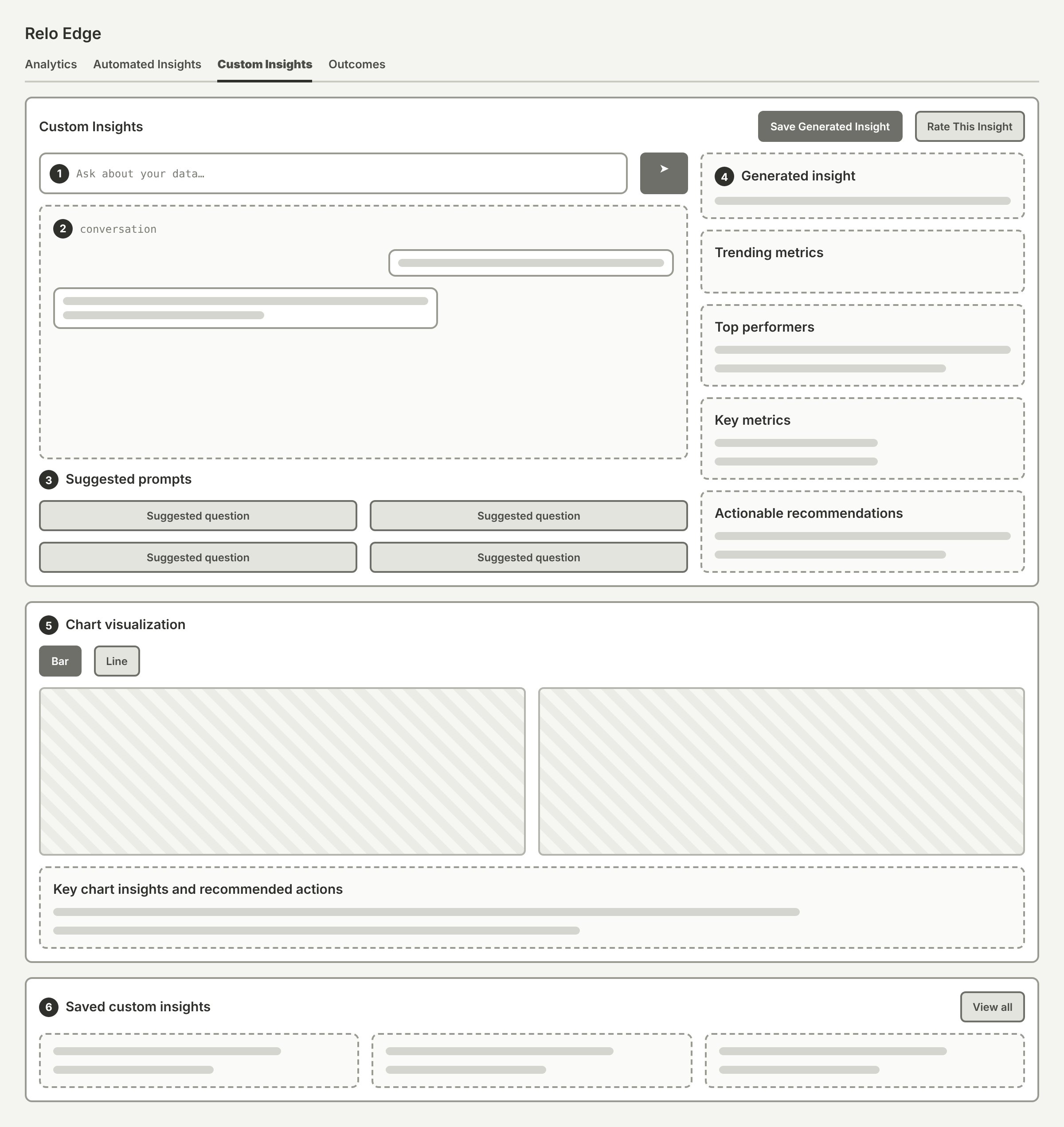
Low-fidelity wireframes
The layout of the two tabs, without colour or content. Each opens full size.
06 · testing
What we tested with clients
The first pilot had been tested in the weekly Relo Edge sessions with enterprise clients, and what they said shaped this version. The product advisory board then reviewed this work every two weeks, first as findings, then as the clickable prototype.
what the pilot tested
Whether the AI insights were relevant, whether they caught anomalies, and whether they were in the right order of priority.
what we heard
Clients liked insights that surface on their own, without being asked for.
why they trusted it
Each insight pairs the narrative with real data and example exposures.
07 · the product
The agent, end to end
Both tabs, full length, with notes on what each part does. The data is sample data. Select a screen to open it large and scroll through it.
Automated Insights
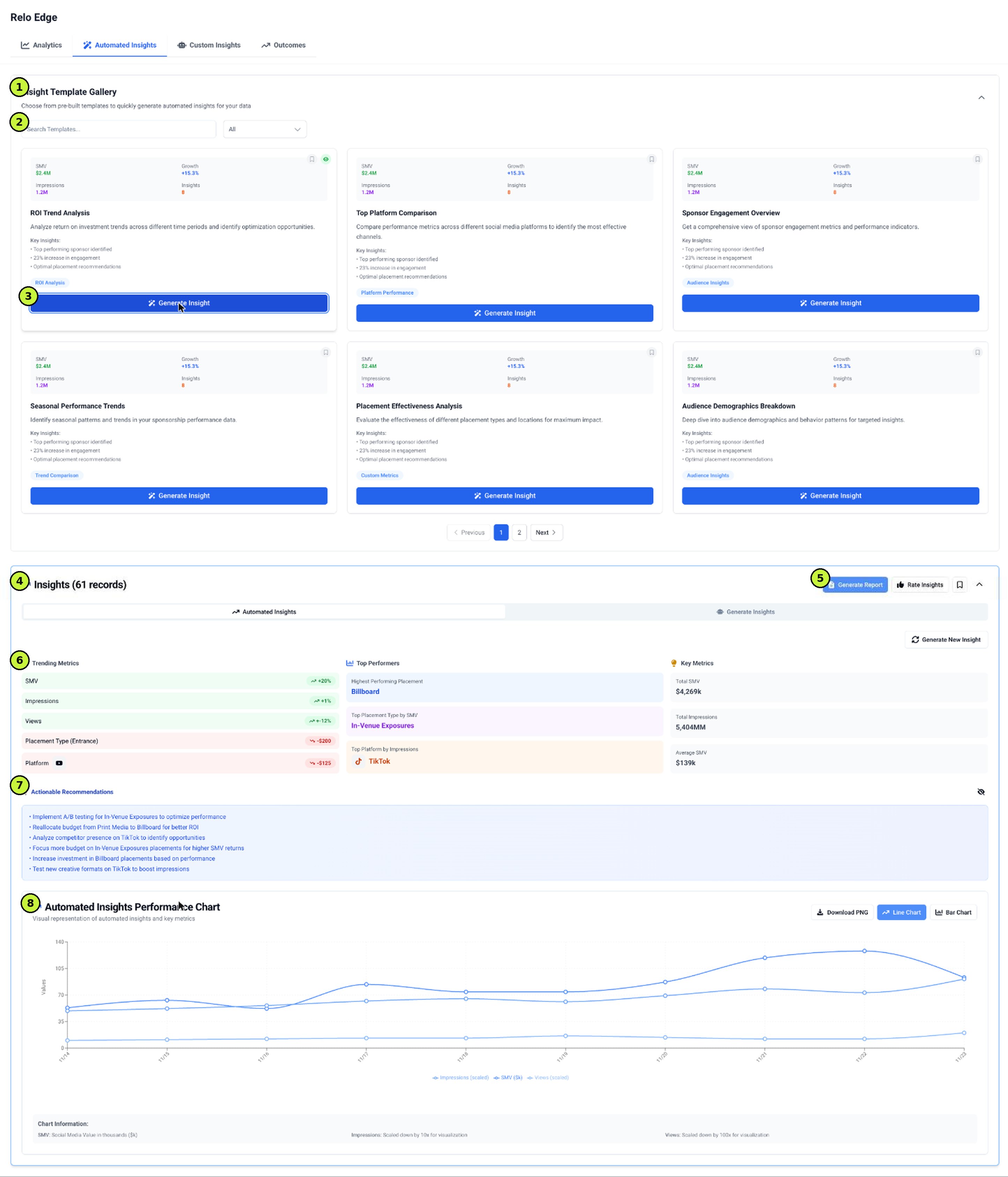
- The template gallery. Each template comes from a question clients ran again and again.
- Search and a category filter, for when the gallery grows.
- One button generates the insight. Nothing to set up.
- The insight opens below, on the same page, so the user keeps their place.
- Generate a report, rate the insight or bookmark it.
- The story first: what is trending, the top performers and the key metrics.
- Recommendations a person can act on.
- The chart is the evidence. Line or bar, and it downloads as an image.
Custom Insights
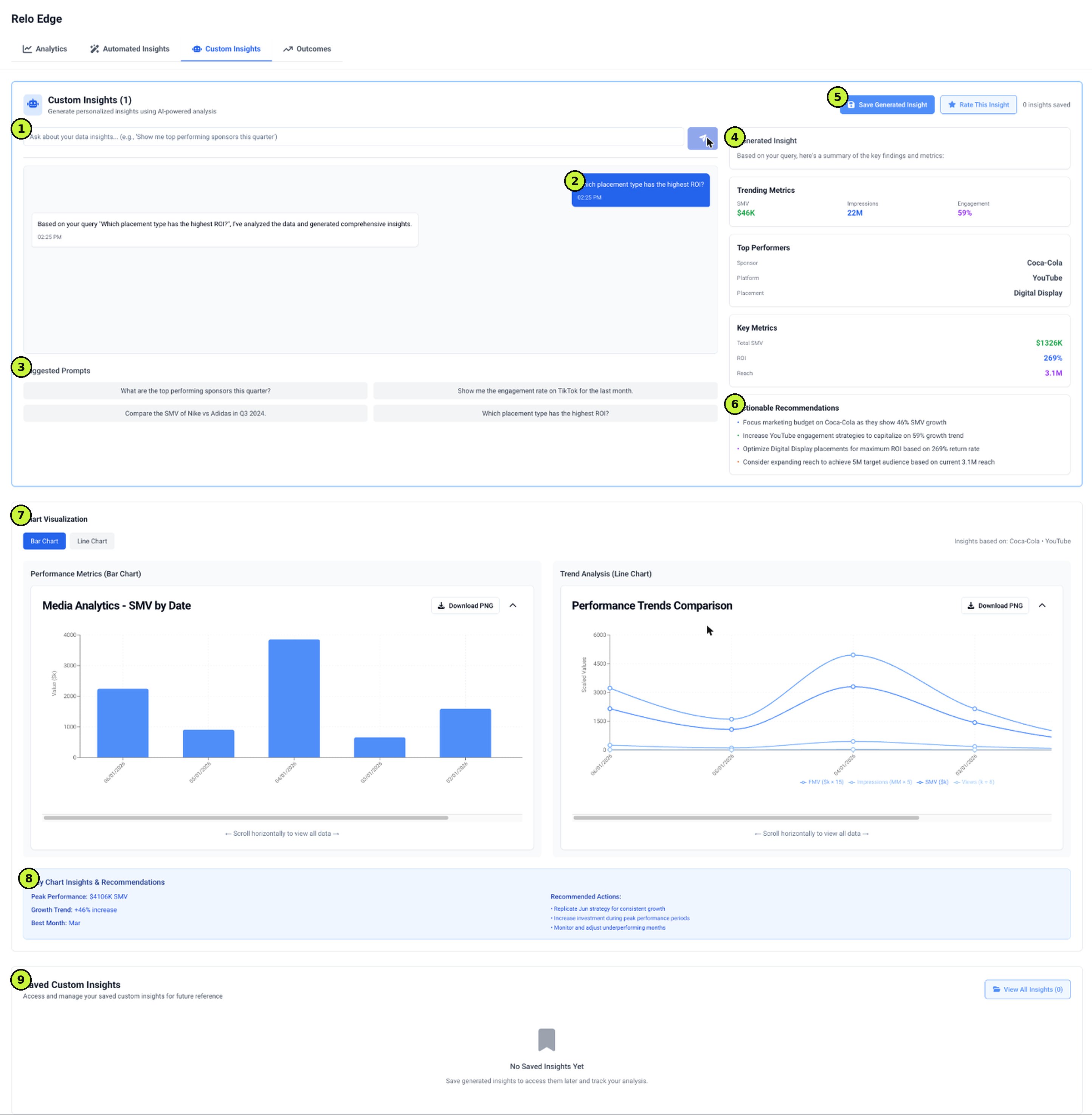
- Ask in plain language.
- The conversation keeps the question and the agent's reply.
- Suggested prompts give a first step, so the box is never empty.
- The answer has the same structure as a pre-built insight.
- Save the insight or rate it.
- Recommendations, tied to the numbers above them.
- Two charts for the same answer. Each downloads as an image.
- Key chart insights and recommended actions.
- Saved insights, to reopen later.
08 · outcome
Outcome
Engineering built the agent from the prototype, and it launched after Relo Edge. Across 40 clients, including NFL, NBA and MLB teams, adoption reached 78%.
- 78%adoption
- 40clients
- 3leagues represented: NFL, NBA and MLB
What I learned
the AI is not the product
The answer is. People trusted insights that explained themselves and showed their evidence.
give every user a first step
A template for one person and a suggested prompt for another do the same job: they remove the empty screen.
start from what people already ask
The saved queries were better evidence than any assumption about what clients would ask an AI.